


Disease Alerts in John Deere Operations Center™
John Deere Operations Center users can receive alerts after connecting to the CropVoice disease alert network.
CropVoice takes the guesswork out of your soybean fungicide decision. In addition to the SMS text message and email, you have the option to connect CropVoice with your John Deere Operations Center account. Making this connection offers two benefits:
- You will be notified of the Disease Alert within the John Deere Operations Center (accessible in your John Deere Operations Center mobile application and on the web-based browser)
- When a Disease Alert occurs for a specific field, CropVoice creates a Work Plan and autopopulates it with the crop and your preferred product mix and rate to save you time and streamline your fungicide application.
Ensure CropVoice is connected with your John Deere Operations Center Account
Follow these instructions, or watch the video below, to ensure CropVoice is connected with your John Deere Operations Center account, or call your CropVoice Customer Success Manager at (217) 264-6964.
Receiving a Disease Alert
When CropVoice detects disease, you will receive a Disease Alert via an SMS text message and a notification through the John Deere Operations Center. Disease Alerts are triggered on a field-by-field basis for your enrolled fields, so you will receive a notification in John Deere Operations Center for each impacted field. Enrolled fields must have a soybean planting event and be within the CropVoice network area to receive a Disease Alert.
You can access the notifications by first logging into your John Deere Operations Center account. On a web browser, look for the bell icon in the top right corner of your screen. A red dot will indicate a new notification. Click the bell icon to see notification details. You can also navigate to https://notifications.deere.com/ to see all notifications.
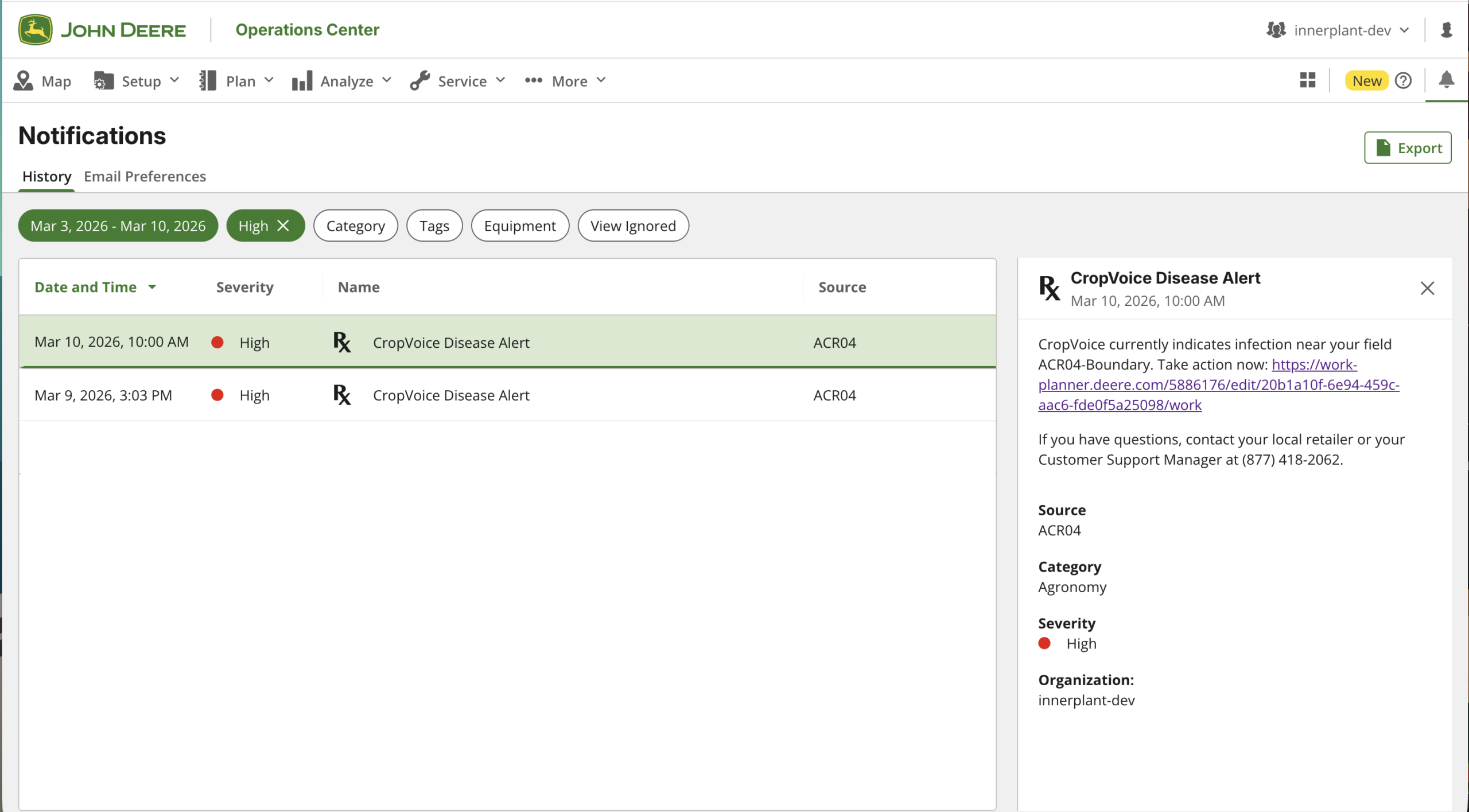
If you are using the John Deere Operations Center mobile app on your phone, here is what the Disease Alert will look like:

Viewing Work Plan created from Disease Alert
On both the John Deere Operations Center accessed through web browser and on the mobile app, you can click the link in the Disease Alert Notification to access the generated Work Plan. You can also navigate to https://work-planner.deere.com/ to see all of the Work Plans.
When you follow the link from the Disease Alert notification, you will see Work Plan details and map view of that specific field that has a triggered Disease Alert:
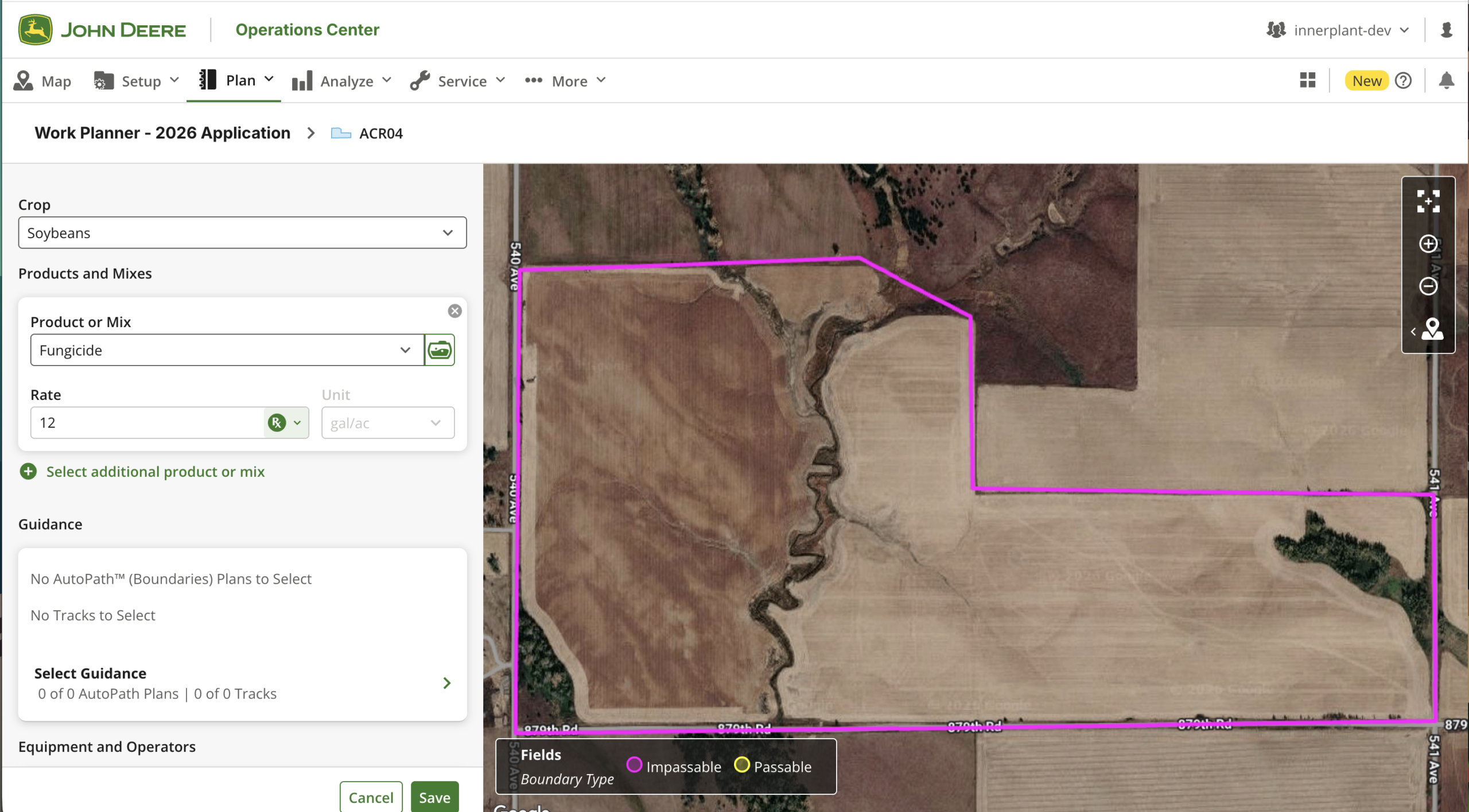
To save you time and streamline your fungicide application, the Work Plan has been autopopulated with the crop and your preferred product mix and rate based on the pre-existing data in your John Deere Operations Center account. You can edit any of these fields. CropVoice does not endorse or select any specific prescriptions, products, or rates.
John Deere Operations Center & CropVoice FAQ
What information about my operation does CropVoice have access to?
When connecting your John Deere Operations Center with your CropVoice account, you’ll be asked to provide access to:
- Organizations,
- Locations,
- and Work
We ask for this information so that we can send you Disease Alert notifications and generate a work plan when disease is detected in your area.
Will a work order automatically get sent to an operator if I receive a disease alert?
A work order will be created, but will not be sent to any operator automatically. It is your decision on whether and when to send a work plan.
How many alerts can I expect to receive about an enrolled field?
You will receive a maximum of one alert per enrolled field each growing season.
Can I see a map of all of my fields enrolled in CropVoice?
There is no map view of all of your fields enrolled in CropVoice at this time, but you can see each field with a Disease Alert one at a time by viewing the Work Plan for that field.
PDF versions of this page and instructions for connecting to Ops Center are available here:
2026_What to Expect_CropVoice and John Deere Ops Center – Guide & FAQ
For additional support connecting CropVoice to Ops Center, you can reach our support team at support@innerplant.com or by calling (877) 418-2062.